

Codely v2.0 public release is here
Lorem ipsum dolor sit amet, consectetur adipiscing elit lobortis arcu enim urna adipiscing praesent velit viverra sit semper lorem eu cursus vel hendrerit elementum morbi curabitur etiam nibh justo, lorem aliquet donec sed sit mi dignissim at ante massa mattis.
- Neque sodales ut etiam sit amet nisl purus non tellus orci ac auctor
- Adipiscing elit ut aliquam purus sit amet viverra suspendisse potent i
- Mauris commodo quis imperdiet massa tincidunt nunc pulvinar
- Adipiscing elit ut aliquam purus sit amet viverra suspendisse potenti
What has changed in our latest release?
Vitae congue eu consequat ac felis placerat vestibulum lectus mauris ultrices cursus sit amet dictum sit amet justo donec enim diam porttitor lacus luctus accumsan tortor posuere praesent tristique magna sit amet purus gravida quis blandit turpis.
All new features available for all public channel users
At risus viverra adipiscing at in tellus integer feugiat nisl pretium fusce id velit ut tortor sagittis orci a scelerisque purus semper eget at lectus urna duis convallis. porta nibh venenatis cras sed felis eget neque laoreet suspendisse interdum consectetur libero id faucibus nisl donec pretium vulputate sapien nec sagittis aliquam nunc lobortis mattis aliquam faucibus purus in.
- Neque sodales ut etiam sit amet nisl purus non tellus orci ac auctor
- Adipiscing elit ut aliquam purus sit amet viverra suspendisse potenti
- Mauris commodo quis imperdiet massa tincidunt nunc pulvinar
- Adipiscing elit ut aliquam purus sit amet viverra suspendisse potenti
Coding collaboration with over 200 users at once
Nisi quis eleifend quam adipiscing vitae aliquet bibendum enim facilisis gravida neque. Velit euismod in pellentesque massa placerat volutpat lacus laoreet non curabitur gravida odio aenean sed adipiscing diam donec adipiscing tristique risus. amet est placerat in egestas erat imperdiet sed euismod nisi.
“Nisi quis eleifend quam adipiscing vitae aliquet bibendum enim facilisis gravida neque velit euismod in pellentesque massa placerat”
Real-time code save every 0.1 seconds
Eget lorem dolor sed viverra ipsum nunc aliquet bibendum felis donec et odio pellentesque diam volutpat commodo sed egestas aliquam sem fringilla ut morbi tincidunt augue interdum velit euismod eu tincidunt tortor aliquam nulla facilisi aenean sed adipiscing diam donec adipiscing ut lectus arcu bibendum at varius vel pharetra nibh venenatis cras sed felis eget dolor cosnectur drolo.
Most M&A data risk shows up in the handoff, not the merger paperwork. If I had to boil this down, I’d focus on five things first: know where sensitive data lives, limit who can touch it, secure every transfer, set clear keep/delete rules, and watch access after close.
Here’s the short version:
- Inventory data first. I need a list of systems, owners, data types, and where data moves.
- Tighten access before connecting systems. That means MFA, SSO, short-term permissions, and cleanup of old accounts, shared logins, and stale vendor access.
- Protect data in transit and at rest. I should treat each migration, file transfer, and API link as a controlled move.
- Set retention and privacy rules early. Customer, HR, finance, and legal records each need their own keep/restrict/delete path.
- Test recovery after close. One stat stands out: only 5% of managed SMB clients had tested a restore in the last 90 days, even though 71% had automated backups.
A simple way to think about it: Day 1 is about control, Days 2–10 are about checking risk, and Days 11–30 are about proving recovery and cleaning up drift.
If I’m working this kind of deal, I’d keep the scope tight, move the highest-risk data last, and document every access and retention choice in plain language.
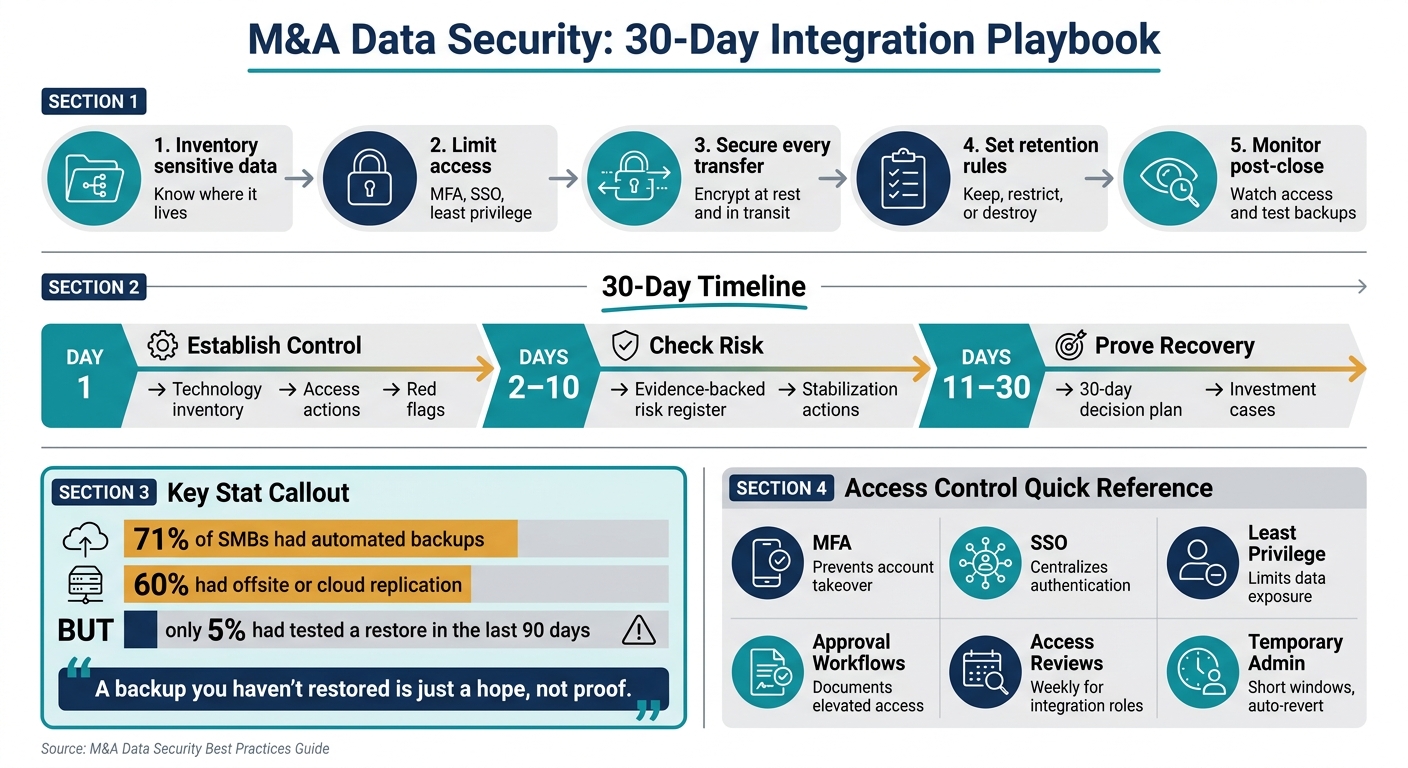
M&A Data Security: 30-Day Integration Playbook
Orville Williams - Securing M&A Integration Without Importing Hidden Risk
sbb-itb-97ecd51
1. Inventory sensitive data and map where it moves
Before you assign controls, get clear on every system, owner, and data path tied to sensitive data. The inventory is your starting point. Without it, access decisions turn into guesswork.
Build a data inventory by system, owner, and sensitivity level
Start with every system that touches sensitive data: applications, databases, queues, storage, identity providers, and external vendor integrations. For each one, record the system name, the actual admin owner, where the data lives, and how sensitive that data is.
Don’t lean only on old spreadsheets or inherited docs. Check access yourself. That extra step can save you from a nasty surprise later.
Group the inventory by data category, such as customer, employee, transaction, analytics, operational, and derived data. Then tag each system based on whether it affects revenue, payroll, customer support, or compliance first. After that, mark what must be ready for Day 1 and what can wait for a later migration.
A simple way to pressure-test the inventory is to trace one customer order from start to finish. That helps surface the systems, people, and handoffs that matter most.
Use this inventory to set access rules in the next step.
Map data flows across people, tools, and third parties
Once you know where data lives, map how it moves. Track where data is created, who can access it, how it moves between systems, where it rests, how long it stays, and how it leaves through exports or deletion.
You’ll also want to verify third-party APIs, services, and licenses. Some data depends on a vendor, and some of it may be hard to rebuild from scratch. So check whether it can be migrated, corrected, or removed under current contracts and legal duties.
Flag any flow that crosses a vendor, account, or export boundary before Day 1.
Separate Day 1 access needs from later migration scope
Not every dataset needs to be available on Day 1. Split the inventory into two buckets: what people need right away and what should stay isolated until you verify controls.
| Data Category | Day 1 Access Needed? | Notes |
|---|---|---|
| Customer, employee, and transaction data needed for operations | Yes | Keep available for continuity |
| Operational systems and integrations | Yes | Support Day 1 controls |
| Vendor-tied data and license terms | Maybe | Confirm migration readiness and contractual constraints |
| Later migration only | No | Keep isolated until controls are verified |
This sequencing keeps the Day 1 scope tighter and cuts integration risk.
With the inventory mapped, you can assign access only where it’s needed on Day 1.
2. Lock down access to deal and integration data
Use your inventory to turn access needs into temporary roles and permissions. Once you know where sensitive data sits, you can turn that map into short-term access rules.
Set role-based access and time-bound permissions
The main idea is least privilege: each person gets only the access needed for a specific integration task, and nothing extra.
Assign access by job function. Finance should get deal models and ledgers. HR should get only transition data. Legal should get data-room and compliance files. IT should get tiered admin roles.
Every role should be temporary. Set an expiration date of 30 to 90 days and remove access when the task ends. If someone needs more time, require documented sponsor approval and log it in a ticketing system like Jira or ServiceNow so there’s a clear audit trail.
After you define roles, clean up any access that doesn’t fit them.
Review legacy accounts, admins, and third-party permissions
Before you connect any systems, audit accounts across both companies. Pull reports from identity systems like Active Directory, Azure AD, or Google Workspace and flag accounts that have been inactive for 60 to 90 days. After confirming they’re no longer needed, disable them.
Remove shared accounts or switch them to named user logins. Shared credentials are tough to audit, and they show up again and again as an entry point in breach investigations. Review all service accounts and API keys with privileged access to databases or HR and finance systems too. Document who owns them and why they exist, disable orphaned ones, and rotate credentials for anything still active.
Do all of this cleanup before SSO between the two companies, VPN connectivity, or data migration tools go live.
Third-party access needs the same treatment. Suspend anything nonessential, require MFA and logging for access that must stay in place, and deprovision data-room access once documents are moved. Research consistently shows that 60% of data breaches involve third parties such as contractors, vendors, and managed service providers with privileged access.
Use a control table to standardize access decisions
Use one control table to keep access decisions consistent across the integration.
| Control | Purpose | When to Apply |
|---|---|---|
| MFA | Adds a second factor to cut account takeover risk | Require for all deal-room, HR, finance, and remote access |
| SSO | Centralizes authentication and makes offboarding easier | Before connecting the acquired company to the main identity provider |
| Least privilege | Limits users to only the data and actions they need | Whenever new integration roles or project folders are created |
| Approval workflows | Makes sure elevated access is justified and documented | Any time admin rights or sensitive folder access is requested |
| Access reviews | Finds over-permissioned or expired accounts | Weekly for integration roles; monthly for standard roles |
| Temporary admin access | Lets IT complete migrations without leaving long-term gaps | Use short, logged elevation windows with automatic reversion |
NIST guidance says control catalogs like this help smaller organizations make steady, risk-based decisions and support compliance audits.
Once access is bounded, secure the data itself in transit and at rest.
3. Encrypt data, secure transfers, and limit unnecessary movement
Once access controls are in place, the next job is to protect data at rest and in transit. Start with your data inventory and map every place sensitive data moves: file transfers, API syncs, migration routes, and system-to-system links.
Encrypt files at rest and in transit across all transfer points
Encrypt customer, employee, financial, and secrets data both at rest and in transit across file sharing, system migrations, and API-based integrations. That includes every connection, even internal links between connected systems.
Send sensitive files only through approved, audited channels. If a transfer path is unknown or relies on unsupported dependencies, block it before it spreads. The point is simple: treat each transfer as a controlled move, not just another copy-and-paste job.
Manage keys, tokenization, and restricted datasets
Use a dedicated key management service. Limit key access to named custodians instead of shared admin accounts. Also record key ownership, tokenization, and migration decisions so there’s a clear audit trail.
Keep high-risk data isolated until controls are verified
Keep the highest-risk datasets out of migration jobs until encryption, logging, and restore tests pass. Only move those datasets after the transfer path has been checked and approved.
Stage migrations only after the path is mapped and signed off. Test the risky route first, including transfers, migrations, and failure paths, before moving more data. Use the first 10 days after close to test transfers, restores, and logging. Then follow the smallest verified transfer approach: move only what you’ve checked, and expand the scope as proof comes in.
4. Set retention rules, privacy controls, and post-close monitoring
Once access and transfer controls are in place, the next problem is simpler to describe and harder to manage: what data stays, what data goes, and what might still be exposed after close.
Define retain, restrict, and destroy decisions by data type
Retention obligations follow the records. When you acquire a business, you also take on its legal and regulatory retention duties - not just the data itself. So you can't just drop acquired records into your current retention schedule and move on.
Instead, build one schedule that maps each data category to the legal rule behind it and the business reason for keeping it. If the acquirer and target have different policies, use the longer or stricter one and document the reason. Use this table:
| Data Category | Retain | Restrict | Destroy |
|---|---|---|---|
| Customer records | 3–7 years in the consolidated CRM or ERP | Customer service, finance, limited sales users | Obsolete lead lists and duplicate exports after centralization |
| Financial and tax records | At least 7 years to align with IRS audit windows | Finance leadership, auditors, tax advisors | Legacy spreadsheets or exports after reconciliation |
| Employee HR files | 3–7 years depending on record type | HR and managers with a documented need to know | Recruiting notes and interview data after the required period |
| Contracts and legal documents | Contract term plus a defined survival period | Legal, finance, and relevant business owners | Earlier drafts and duplicates once the executed version is stored |
| IT and security logs | 12–24 months | IT and security teams only | Older logs unless a legal hold or regulation applies |
After migration and counsel signoff, delete obsolete lists, duplicate exports, and redundant due diligence files unless a legal hold applies. If litigation is reasonably anticipated, or if a government investigation or regulatory inquiry is underway, routine deletion has to stop for the affected records. Track active holds and review them on a set cadence so records don't sit around forever after the preservation duty ends.
The FACTA Disposal Rule also requires businesses to take reasonable steps to destroy consumer information in paper and electronic form when it is no longer needed. For electronic records, NIST 800-88 is a practical standard for sanitization.
These decisions set the ground rules for privacy rights, deletion requests, and transfer limits.
Address U.S. privacy obligations and cross-border transfers
As of 2026, 20 U.S. states have enacted consumer privacy laws, which means SMBs merging multi-state customer data need to account for access, deletion, and opt-out rights that can differ by state.
California's CPRA stands out because it can apply based on a standalone annual revenue threshold of about $26.6 million, no matter the data volume. If the acquired company was already subject to CPRA, those duties need to carry into the combined environment. Sector rules can add more pressure. HIPAA covers protected health information, and GLBA covers non-public personal information handled by covered financial institutions. Both require documented retention policies and tight access controls.
Retention answers how long. Privacy law answers whether the data can stay available and under what conditions. That's a key difference.
Cross-border issues often slip through the cracks in SMB deals. If the acquired company held data on EU or UK individuals, or used SaaS tools with European users, those datasets may be subject to GDPR transfer restrictions. Do not move EU or UK personal data into U.S.-hosted systems until legal counsel confirms the transfer mechanism. Keep a register of cross-border data flows, and place a hold on high-risk datasets until that review is done.
Monitor access, test backups, and prepare for incidents
Once retention rules are set, keep watching for access drift, failed deletions, and backup copies that outlive their retention window.
Make sure every system still logs access, exports, and permission changes after close. That includes CRM, HR, finance, file storage, and integration middleware. Where you can, centralize those logs. Set alerts for unusual download volume, logins from unexpected locations, and permission escalations. Then review access on a regular schedule to make sure temporary integration-era permissions are gone and only current, needed access remains.
Backup checks are where many SMBs stumble. A Q2 2026 SMB technology report found that 71% of managed SMB clients had automated backups and 60% had offsite or cloud replication, but only 5% had performed a tested restore within the last 90 days. That gap matters. A backup you haven't restored is just a hope, not proof.
Run one controlled restore after close to confirm that retained backups still follow current access controls and that destroyed data is not still recoverable. Also check that data marked for destruction is not being kept forever inside backup chains without anyone noticing.
Then update the incident response plan so it matches the integrated environment. Spell out what counts as a security incident, assign roles across both legacy and new teams, and document escalation paths, including when legal counsel and regulators need to be notified. Run at least one tabletop exercise in the first few months after close so people know the playbook before something breaks.
Conclusion: A clear security sequence for safer M&A integrations
After inventory, access control, secure transfers, retention, and monitoring, the next step is a 30-day stabilization plan. That first month after close matters a lot. It’s when teams need to sort urgent issues, reconcile data, and check that controls work before small gaps turn into day-to-day incidents.
Use the sequence below to put those controls into practice.
| Window | Primary Objective | Output |
|---|---|---|
| Day 1 | Establish ownership, access, and immediate stop risks | Technology inventory, access actions, red flags |
| Days 2–10 | Validate dependencies, security, and data resilience | Evidence-backed risk register and stabilization actions |
| Days 11–30 | Test recovery and align technology decisions with the integration plan | 30-day decision plan and investment cases |
Write down every access decision, retention rule, encryption choice, and data-flow exception, along with the business reason behind it.
That gives the integration a controlled, traceable path with fewer hidden risks.
FAQs
What data should we secure first in an M&A integration?
First, lock down the setup for sharing sensitive data.
Start with an NDA. Then store documents in a virtual data room that uses encryption, two-factor authentication, and role-based access controls.
It also helps to use a tiered disclosure approach. That means you don’t hand over your most sensitive files all at once. Instead, you limit access to high-risk items - like customer lists, employee data, trade secrets, and financial records - until the buyer shows serious interest.
How long should integration access stay active?
Integration access should stay active only for as long as the review needs it. Once that part of the integration or due-diligence process is done, access should be shut off.
Keep sensitive data locked to the right review stage. Use a secure data room with access controls and audit trails, and keep information current. That means posting major events within 48 hours and handling simple requests within 24–48 hours.
Confidentiality terms usually run 2–5 years. Trade secrets, though, need protection with no end date.
Why is restore testing so important after close?
Restore testing after closing matters because transitions rarely go exactly as planned. Systems change hands, data moves, teams merge, and small issues can turn into big operational problems fast. If you skip system testing, you risk service disruptions and downtime right when the business needs stability most.
When you confirm that data restoration works the way it should, you give the business a solid fallback option. If something breaks during integration, the team can act fast instead of scrambling. That kind of preparation helps protect the value of the acquisition and makes the transition less rocky.