

Codely v2.0 public release is here
Lorem ipsum dolor sit amet, consectetur adipiscing elit lobortis arcu enim urna adipiscing praesent velit viverra sit semper lorem eu cursus vel hendrerit elementum morbi curabitur etiam nibh justo, lorem aliquet donec sed sit mi dignissim at ante massa mattis.
- Neque sodales ut etiam sit amet nisl purus non tellus orci ac auctor
- Adipiscing elit ut aliquam purus sit amet viverra suspendisse potent i
- Mauris commodo quis imperdiet massa tincidunt nunc pulvinar
- Adipiscing elit ut aliquam purus sit amet viverra suspendisse potenti
What has changed in our latest release?
Vitae congue eu consequat ac felis placerat vestibulum lectus mauris ultrices cursus sit amet dictum sit amet justo donec enim diam porttitor lacus luctus accumsan tortor posuere praesent tristique magna sit amet purus gravida quis blandit turpis.
All new features available for all public channel users
At risus viverra adipiscing at in tellus integer feugiat nisl pretium fusce id velit ut tortor sagittis orci a scelerisque purus semper eget at lectus urna duis convallis. porta nibh venenatis cras sed felis eget neque laoreet suspendisse interdum consectetur libero id faucibus nisl donec pretium vulputate sapien nec sagittis aliquam nunc lobortis mattis aliquam faucibus purus in.
- Neque sodales ut etiam sit amet nisl purus non tellus orci ac auctor
- Adipiscing elit ut aliquam purus sit amet viverra suspendisse potenti
- Mauris commodo quis imperdiet massa tincidunt nunc pulvinar
- Adipiscing elit ut aliquam purus sit amet viverra suspendisse potenti
Coding collaboration with over 200 users at once
Nisi quis eleifend quam adipiscing vitae aliquet bibendum enim facilisis gravida neque. Velit euismod in pellentesque massa placerat volutpat lacus laoreet non curabitur gravida odio aenean sed adipiscing diam donec adipiscing tristique risus. amet est placerat in egestas erat imperdiet sed euismod nisi.
“Nisi quis eleifend quam adipiscing vitae aliquet bibendum enim facilisis gravida neque velit euismod in pellentesque massa placerat”
Real-time code save every 0.1 seconds
Eget lorem dolor sed viverra ipsum nunc aliquet bibendum felis donec et odio pellentesque diam volutpat commodo sed egestas aliquam sem fringilla ut morbi tincidunt augue interdum velit euismod eu tincidunt tortor aliquam nulla facilisi aenean sed adipiscing diam donec adipiscing ut lectus arcu bibendum at varius vel pharetra nibh venenatis cras sed felis eget dolor cosnectur drolo.
My rule for sharing deal documents: set access controls before the first upload. This is especially critical when you find a business for sale and begin the transition to due diligence. I organize records before due diligence, share only public or non-sensitive information before an NDA, and keep confidential files in a secure virtual data room.
Here’s the approach I follow:
- Limit access: Give each person an individual account, role-based permissions, and multifactor authentication. Restrict sensitive data and allow downloads only when needed.
- Keep 1 master version: Co-edit working files - not source records - and track questions, dated answers, and approvals in one issue log.
- Check each deal stage: Review permissions as diligence moves toward closing, and remove access that no longer fits.
- Handle errors and closeout: Stop incorrect sharing, preserve logs, and contact counsel. Save the deal record and check retention duties before deleting files.
<u>Revoking access does not recover copies already saved.</u> That’s why I plan both sharing and closeout from the start.
Document Access and Confidentiality
Access to sensitive documents
Grant access by role and limit it to what each person needs. First, verify identity, authorization, and confidentiality terms. Sellers should see only assigned records; buyers, role-specific folders; advisers, assigned materials; and lenders, approved financial, collateral, and repayment records.
Give each user an individual account. Maintain an access register that records their organization, role, approval date, agreement status, and expiration date. An NDA sets legal duties; platform controls enforce access rules.
Redact employee IDs, customer data, and bank account numbers that aren’t needed. For competitively sensitive information, use aggregation, staged disclosure, and approved restricted review groups. Store privileged advice in a restricted legal folder, and get counsel’s approval before sharing it. Keep passwords, API keys, and recovery codes out of diligence folders entirely.
Downloading and editing permissions
Keep original files read-only by default. Allow downloads or printing only for a clear business, legal, financing, or regulatory need. Give upload or editing rights only to designated contributors, and keep editable files in a separate working-copy folder.
| Control | Risk addressed | Limitations | When to apply it |
|---|---|---|---|
| Encryption in transit and at rest | Interception or unauthorized access to stored files | Does not stop an authorized user from viewing or copying data | For all deal documents, especially personal, financial, and contract information |
| Multifactor authentication | Stolen or reused passwords and account takeover | Users may still approve phishing attempts or misuse valid access | For every user, particularly administrators, advisers, lenders, and restricted review groups |
| Role-based permissions | Excessive access and accidental exposure | Requires accurate role assignments and regular review | Before first disclosure and whenever a participant’s role changes |
| Download and print restrictions | Uncontrolled local copies | Cannot prevent screenshots or copying by an authorized viewer | During early diligence and for highly sensitive records |
| Watermarking | Redistribution without attribution and weak deterrence | Watermarks can be removed or obscured from copied content | On downloads, prints, and highly sensitive or bidder-specific files |
| Audit logs | Inability to investigate access, downloads, or permission changes | Logging detail, retention, and accuracy vary by platform | Enable before disclosure and preserve throughout the deal |
| Version history | Confusion about which document is authoritative and changes that go undetected | May not record edits made to downloaded copies | For schedules, financial models, contracts, and buyer response files |
| Access revocation and expiration | Former participants retaining access | Cannot recover files already saved or redistributed | At role changes, bidder withdrawal, transaction completion, or termination |
Responding to incorrect sharing
Contain the error immediately. Revoke access, disable the incorrect sharing link, and remove the document from the wrong location if possible. Preserve timestamped activity records, the affected document, and available access records. Don’t clear the activity history.
Promptly notify the deal administrator and legal counsel so they can assess confidentiality, privacy, contractual, and notice duties.
Record what was exposed, who could access it, how long the exposure lasted, and any logged views, downloads, prints, or onward disclosure. Logging varies by platform: a recorded view doesn’t prove someone read the document, and no download event doesn’t rule out screenshots or other copying.
Revoking access stops future platform access, but it cannot recover saved or redistributed copies. Document the actions taken to contain the error.
With access controlled, the next step is managing co-edits, comments, and version history.
sbb-itb-97ecd51
Co-Editing and Version Control
Files to co-edit
Co-edit working files, not source records. Diligence working files include request trackers, management-response logs, issue logs, and internal analyses. Give each file an owner who checks completeness, maintains evidence links, and updates its status.
Link these files to controlled source records. Keep buyer-internal analysis separate from seller-facing responses, and maintain one master version of each working file.
Avoiding conflicting versions
Maintain one authoritative master file for each working document. Use consistent filenames, version identifiers, and upload dates. Keep filenames stable so version history remains usable. Label older copies Superseded - Do Not Use and retain them under the retention policy.
For material revisions, record what changed, when it changed, and which diligence issue it affects. Notify reviewers who rely on that information.
If competing local copies exist, pause edits and compare them with the master. Have the file owner merge valid changes, record who approved the reconciliation, and publish a new revision. Clearly identify the authoritative file, then track open questions in a central issue log.
Tracking questions and comments
With version control in place, track open questions in a separate issue log. Use document-linked comments for small clarifications. Put questions that need evidence, approval, or follow-up in a central diligence issue tracker.
Record the request ID, linked document, question, owner, responsible respondent, evidence needed, due date, status, and closed date. A seller’s answer moves the item to review - not directly to closure. Close it only when the reviewer confirms that the answer and evidence address the question.
Keep material seller-response revisions rather than overwriting earlier representations. Connect the original question to dated answers, supporting records, and the final resolution. Keep negotiation notes and valuation deliberations in a restricted internal workspace.
Explaining Due Diligence Data Rooms // Ep 29 of Dealmaking with Laura DiFrancesco
Document Sharing by Deal Stage
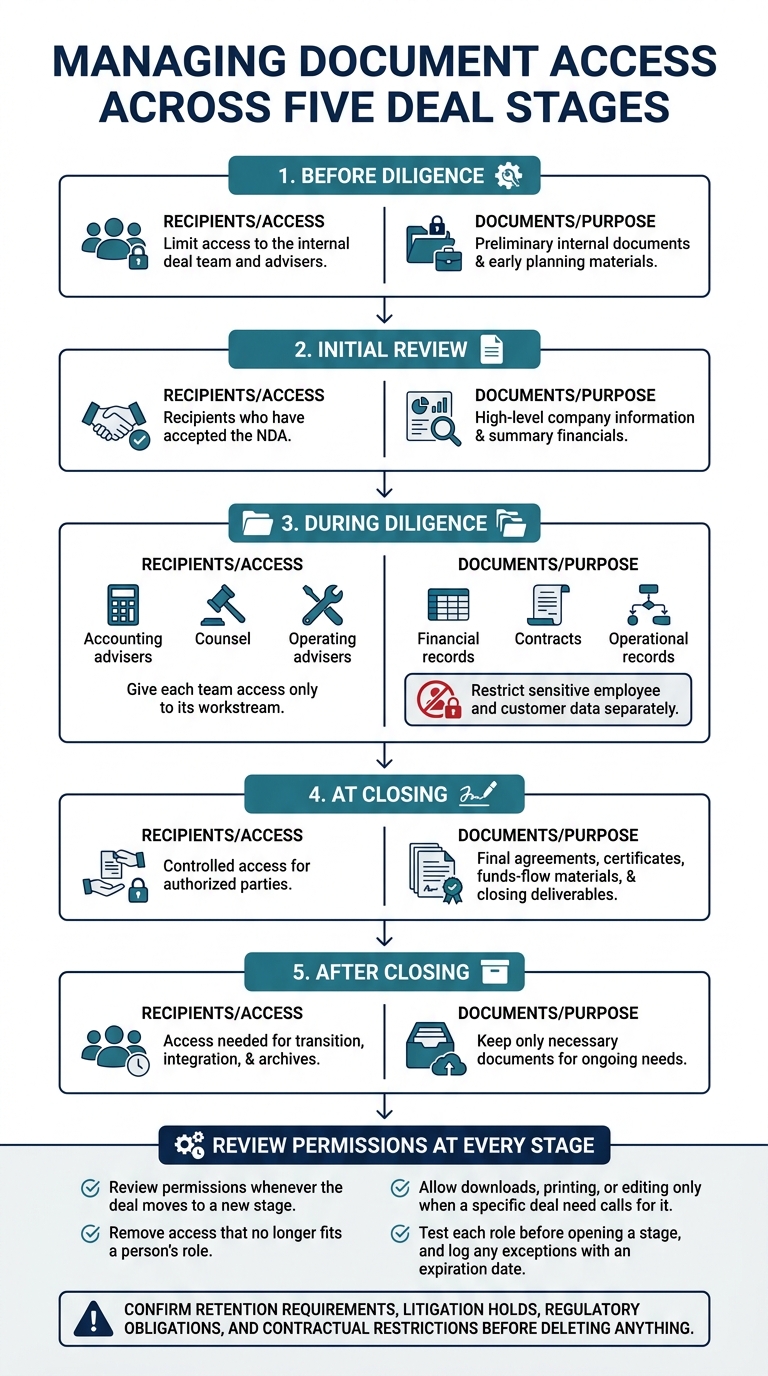
Document Sharing by Deal Stage
Access changes during the deal
Expand access based on need. Before diligence, limit access to the internal deal team and advisers. For initial review, share only high-level company information and summary financials with recipients who have accepted the NDA.
During diligence, give each team access only to its workstream: financial records for accounting advisers, contracts for counsel, and operational records for operating advisers. Restrict sensitive employee and customer data separately.
At closing, provide controlled access to final agreements, certificates, funds-flow materials, and other closing deliverables. After closing, keep only the access needed for transition, integration, and archives.
Review permissions whenever the deal moves to a new stage. Remove access that no longer fits a person’s role. Allow downloads, printing, or editing only when a specific deal need calls for it. Test each role before opening a stage, and log any exceptions with an expiration date.
Then organize the workspace so every workstream has one clear home.
Organizing shared documents
Use workstream folders, with stage and status labels for filtering rather than separate copies. Name an owner for each folder. Maintain one request index that records the request number, owner, requested document, status, response date, and follow-up question.
| Organization method | Suitable use | Limitations |
|---|---|---|
| By workstream | Diligence ownership and role-based access | Best for documents tied to one primary workstream |
| By transaction stage | Separating preparation, initial review, diligence, and closing deliverables | Can create duplicates and confusion |
| By document status | Tracking requested, received, under review, approved, superseded, or restricted items | Status alone does not show ownership |
| Workstream folders with stage and status labels | Recommended: organize by workstream and filter by deal stage and document status | Requires consistent labels, ownership, and permission reviews; labels do not control access |
This setup makes closeout faster because final files, drafts, and restricted items are already separated.
Checks before closing or ending access
Complete a documented closeout checklist before shutting down the deal workspace. If the deal ends without closing, check whether the NDA requires confidential information to be returned, deleted, or certified for destruction.
- [ ] Resolve open requests, Q&A items, comments, and issues, or record how each was handled. Preserve the final record set, audit logs, permission history, Q&A history, and relevant communications.
- [ ] Verify that final agreements, schedules, exhibits, certificates, and closing deliverables are complete and clearly labeled.
- [ ] Remove outdated drafts, duplicates, superseded versions, and unapproved exports from the active workspace. Revoke unneeded user, guest, link-sharing, download, and administrator access. Record any retained transition, integration, audit, or archive access, and set end dates where appropriate.
- [ ] Confirm retention requirements, litigation holds, regulatory obligations, and contractual restrictions before deleting anything.
- [ ] Name the archive owner and specify the storage location and retrieval process for approved users after closing or termination. State who can retrieve records without reopening the full deal room.
Conclusion: Document-Sharing Practices
Set controls before the first upload. Keep one authoritative master version, and record questions, approvals, and changes in a single timestamped history.
Save the deal record before revoking access.
Kumo helps teams find and track acquisition opportunities. Once confidential documents enter diligence, use a secure diligence workspace with separate permissions, version control, Q&A tracking, and audit logs.